Every product a manufacturer buys, builds, or sells has a record. That record holds everything: the description, the unit of measure, the lead time, the default warehouse location. It is the foundation that every purchase order, job, shipment, and inventory count refers back to.
Right now, that record lives at a desk. Getting to it means finding a terminal.
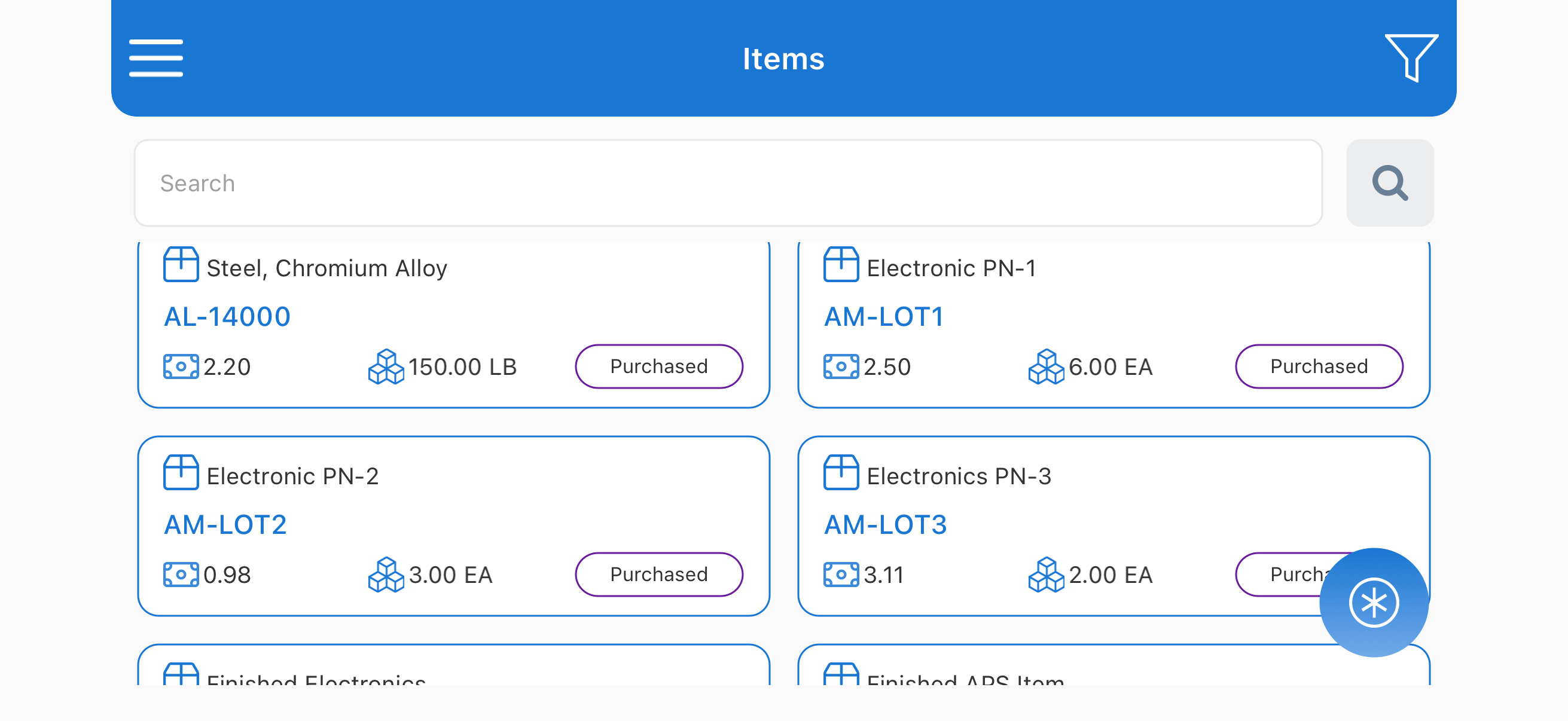
That changed in August. SyteRoam now puts the Items form on mobile, so your teams can look up a part's details from wherever they are standing.
What the Items form is and why it matters
In SyteLine, every item has a record called the Items form (also known as the item master). It holds the critical data that ties everything together in your manufacturing operation: part number, description, unit of measure, lead time, default warehouse location, cost information, status.
Everything in SyteLine that moves inventory, builds a product, or processes an order refers back to this record. A purchase order links to verify lead time. A work order links to confirm the bill of materials. An inventory count links to validate quantities. A shipment links to confirm unit of measure.
The Items form is foundational. Data quality in the Items form determines data quality across the entire system.
The problem with keeping Items form at a desk
SyteLine's Items form is comprehensive, built for someone sitting at a workstation with time to navigate screens. That assumption breaks down the moment work happens away from a desk.
In most manufacturing operations, someone needs item details multiple times a day, and those questions come up on the production floor, at a supplier's site, or in a warehouse aisle. When the answer is locked at a terminal, the work stalls. A planner commits to a schedule without verifying lead time. A buyer negotiates without confirming unit of measure. A warehouse worker guesses at locations. A field technician promises a callback.
These are not edge cases. They are the ordinary friction of information that is inaccessible in the moment it matters.
How SyteRoam brings the Items form to mobile
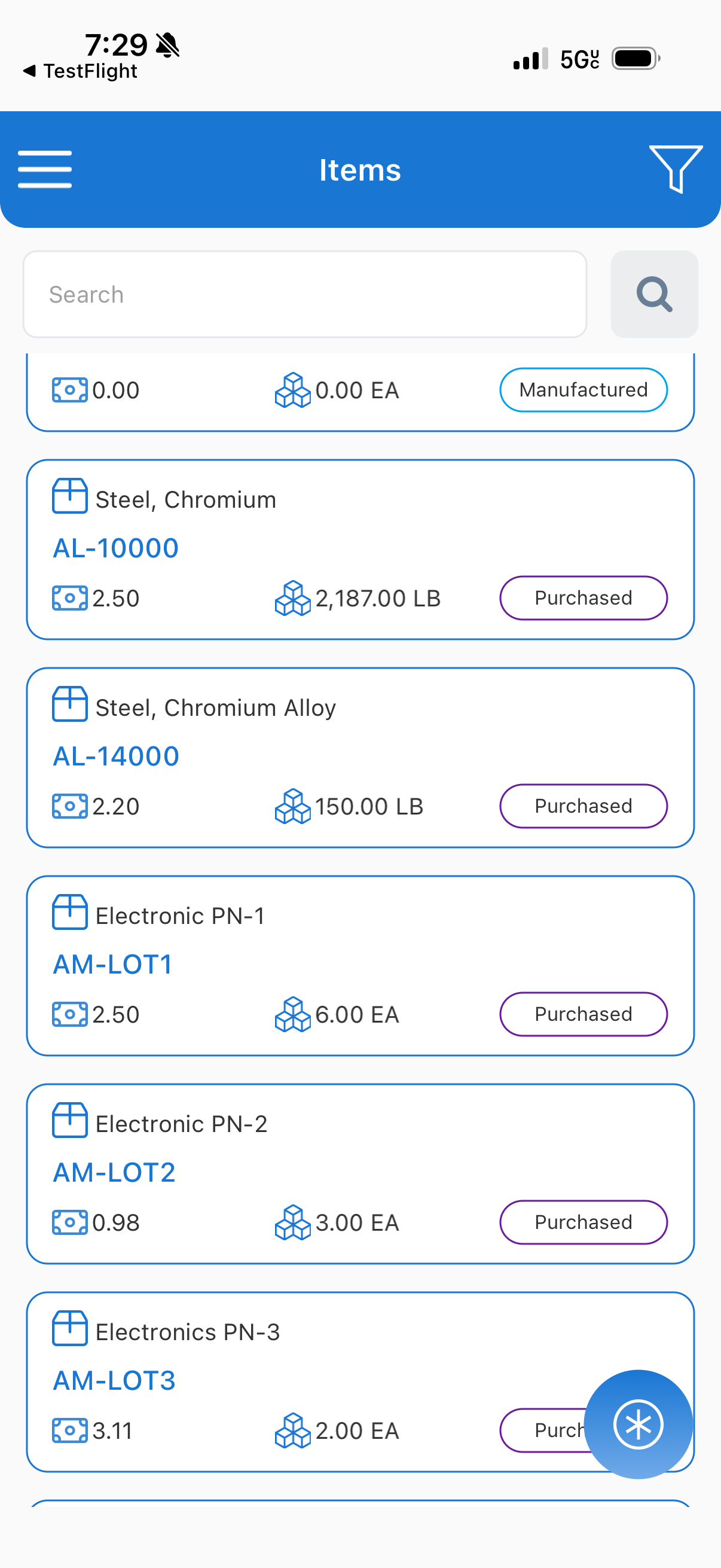
Starting August, SyteRoam gives your teams live access to the Items form from a phone or tablet.
Look up a part number and see the full item record: description, unit of measure, lead time, default location, cost, status, and all the detail that lives in SyteLine. Everything is live, pulled directly from your SyteLine ERP system the moment you query it. Not cached, not a summary, not a watered-down view. The actual item record your system holds.
All of it works within each user's existing SyteLine roles and permissions. If a user can access the Items form on the desktop, they can access it on mobile. Simple. Secure. No new configuration.
Real scenarios where mobile Items form delivers
Production floor verification. A planner is releasing a work order for 500 units and needs to confirm a critical component's lead time. With mobile access, they look it up in seconds, see it is 3 weeks, and assess whether the schedule works. Without mobile access, they walk back to a terminal or call the office, and the release gets delayed.
Supplier negotiation. A buyer is at a supplier's facility and needs to confirm the exact unit of measure for an order. With SyteRoam, they pull up the item record on the spot and verify in the conversation. Without mobile access, they check back later or rely on memory.
Warehouse receiving. A warehouse worker is receiving stock and needs to confirm the default location for a new part. With mobile access, they check on the spot and put stock in the right place immediately. Without it, they guess or stop to find a computer.
On-site customer service. A field technician with a customer needs the specs on a part from last year. With SyteRoam, the technician pulls the full item record on-site. The customer gets an accurate answer immediately. Without it, the technician promises a callback.
The benefits that compound
When your teams can access item details from anywhere, work orders release faster, supplier conversations move forward without delays, warehouse accuracy improves, and customer service improves because field teams have the information they need without callbacks.
Authority: Items form access, done securely
The Items form is critical data that needs secure access, with the same controls that protect your SyteLine ERP system.
SyteRoam does exactly that. It connects live to your CloudSuite Industrial (SyteLine) environment. Every user sees exactly what their SyteLine roles allow. No separate database, no parallel access layer, no new permissions to create. The security model you have already built is the security model on mobile.
Get started with mobile Items form access
The Items form is now live on SyteRoam, available on Android and iOS. Your teams can start looking up part details from anywhere without walking back to a desk.
See it in action. Book a demo and we will walk you through how mobile access to the Items form changes your workflow.
Frequently Asked Questions
What information is available in the mobile Items form?
Everything that is in the SyteLine Items form on the desktop: part number, description, unit of measure, lead time, default warehouse location, cost information, status (active or obsolete), and all other item details your SyteLine system holds.
Is the mobile Items form read-only?
Yes, for this release, the Items form on mobile is read-only. You can look up and view all item details. Updates to item records continue through the desktop SyteLine system.
Do I need new permissions to access the Items form on mobile?
No. SyteRoam inherits your existing SyteLine roles. Whatever a user can view on the desktop Items form, they can view on mobile.
Is the data live or cached?
All data is live. When you look up an item, SyteRoam pulls the current item record from your SyteLine ERP system at that moment.
What devices can access the mobile Items form?
SyteRoam works on any Android or iOS device with an internet connection.